[Misc] A SumatraPDF alternative for Linux? Sort of
Status of Linux PDF readers
Everybody knows PDF. Everybody uses PDF. In fact, PDF is so ubiquitous that one of the first things most people do on a fresh Windows install is download a PDF reader. On my Windows machine, my choice is SumatraPDF. For advanced PDF features, Adobe Acrobat & Foxit are there. Although I don’t like them, they get the job done for what I need.
When it comes to Linux, people tend to care more about open-source software. Proprietary PDF readers exist on Linux, but most Linux users use what’s shipped by default. In fact, most distributions ship a document reader with PDF support as part of their desktop environment. For GNOME, it’s Evince/Papers; for KDE Plasma, it’s Okular. Of course, there are more than those two: Zathura, Sioyek, Atril, Xreader, just to name a few.
The common issue with those readers is that they are either too niche (Zathura, Sioyek) or somewhat average in terms of functionality. Take Zathura, for example: its MuPDF backend is excellent in terms of speed, but the UX is not always great for all users. Okular, on the other hand, is quite good in terms of being user-friendly, but the Poppler engine can be sluggish on large PDFs, and other backends are just bad.
Here’s a quick comparison of the open-source Linux readers mentioned above. “User friendly GUI” is a subjective assessment of how approachable the interface is for someone used to menus and mouse controls. “Featureful” describes the reader’s tools beyond basic viewing; it doesn’t mean full PDF editing. Features can vary with the version shipped by your distribution.
| Reader | PDF Engine | User friendly GUI | Features | Security features |
|---|---|---|---|---|
| Okular | Poppler | Yes | High | — |
| Papers | Poppler | Yes | Moderate | Shipped AppArmor profile (Debian) |
| Evince | Poppler | Yes | Moderate | — |
| Atril | Poppler | Yes | Basic | — |
| Xreader | Poppler | Yes | Moderate | — |
| Zathura | Poppler/MuPDF | Keyboard focused | Basic/Specialized | Seccomp/Landlock in lockdown mode (opt-in) |
| Sioyek | MuPDF | Keyboard focused | High/Specialized | — |
I believe many Linux users low-key want a SumatraPDF reader for Linux. SumatraPDF is fast, lightweight and open-source, and supports a bunch of document formats. Although also based on MuPDF, SumatraPDF has always been, and probably will always be, Windows-only software because of its tight integration with the Win32 API. But with AI, porting it to Linux should be easy, right? Right?
SumatraPDF for Linux - but not quite
If you have software engineering experience, you know that writing a PDF or a document reader is no joke. Even with AI, there’s a lot of work to do, and you have to do it right. You can’t ask AI to do that and hope it’ll work correctly. Fortunately, Okular is a mature reader with a good backend API. So, I decided to make a backend for Okular instead. Check it out here: okular-mupdf-ng
Okular is KDE Plasma’s native document reader. The software is advertised as supporting multiple document formats. For the formats I tried, only the PDF backend’s quality was good. EPUB and MOBI rendering in Okular is terribly slow and incomplete. Here’s a quick comparison of the official EPUB backend (left) and MuPDF-ng (right) opening the same EPUB, with a shared timer starting at the opening action.
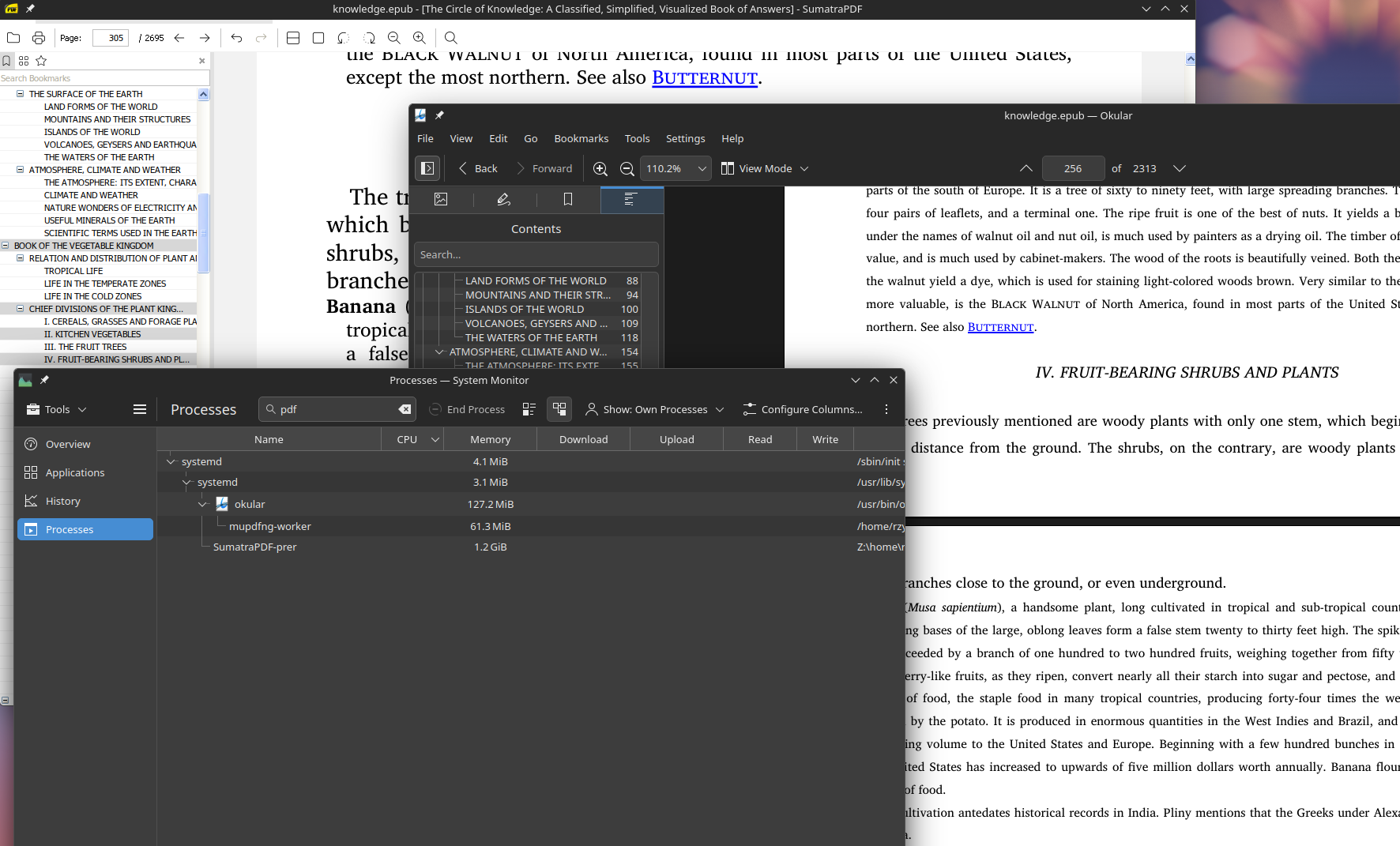
Also, memory consumption of Okular with okular-mupdf-ng and SumatraPDF on Wine are very different. I don’t know if it’s Wine compatibility layer or not. In the test, what I did was opening a 50MiB ePUB file, scrolled all the way up and down, then selected a page. Okular with this plugin used roughly 200MiB, while SumatraPDF devoured 6 times the amount.
But it’s more than SumatraPDF
MuPDF isolation
The MuPDF worker is isolated with Linux sandboxing technologies, e.g., seccomp, Landlock, namespaces and resource limits. While this might look like overkill, it is not. PDF has been known as the “Payload Delivery Format”. PDF is a complicated format that wraps many other formats — images, videos, text, SVG, JavaScript, and even more. The more complicated a format is, the more attack surface it has.
So if you open a random PDF from the internet, you don’t want to open it in just any reader. The safest choice is your browser, because the PDF reader in the browser inherits the browser’s mature and well-tested security model. I’m trying to follow the same idea — isolate the PDF engine to reduce its blast radius if it is exploited.
This follows Google’s rule of two. Almost all native document readers on Linux violate that rule. The isolation is intended to reduce the permissions of the most vulnerable part of the program — the PDF engine.
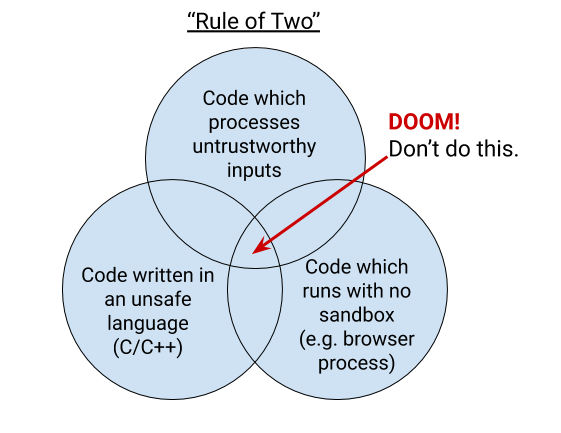
Browsers aside, this will make Okular the only known native PDF reader for Linux that has this kind of comprehensive security protection.
What about?
If PDF is a large attack surface, why do all major PDF readers on Linux use in-process rendering?
There are many reasons:
- Technical challenge: without AI, it’s a huge challenge; with AI, it’s still a major one.
- Poppler is the dominant standard PDF library for Linux because of its license (GPL), but it’s designed for in-process rendering with its official bindings.
- Bubblewrap, Firejail, etc. exist to compensate for the lack for a dedicated sandbox. They are not enough, but acceptable in some cases.
What about GNOME? I don’t want to use Okular on GNOME.
If you don’t mind some KDE dependencies on another DE, use Okular. I use Okular on my Xfce distro, and it’s great. If you really don’t want to, this plugin can be ported to Papers with a bit of effort, because I intentionally made the components portable and less dependent on Qt. In fact, I have made an MVP for Papers, but the Papers backend API is limited compared to that of Okular, so I’ll probably wait until Papers has a better API.
What about other AI-developed PDF readers/editors?
PDFCraft, for example, is an interesting project for advanced PDF features. I think it has potential; however, the app is still immature in many areas. Rust’s PDF libraries are not mature yet. The GUI (egui) is not suitable for software rendering, and there are many other issues that will be resolved over time, but for now it’s not ready.
Thank you for reading, and stay safe!